
The agent can ask for more access. A person outside the sandbox answers.

NVIDIA announced its Open Agent Safety Platform on September 28. The software half is OpenShell, an open-source runtime that decides which systems and data an agent can reach. NVIDIA's reasoning fits in one line: "enterprises need an enforceable boundary outside of the model and agent harness." Version 0.1.0 already runs Codex and Claude Code. This note wires it around one coding agent. For why deny-by-default comes first, read Deny-by-default before you give the agent a browser.
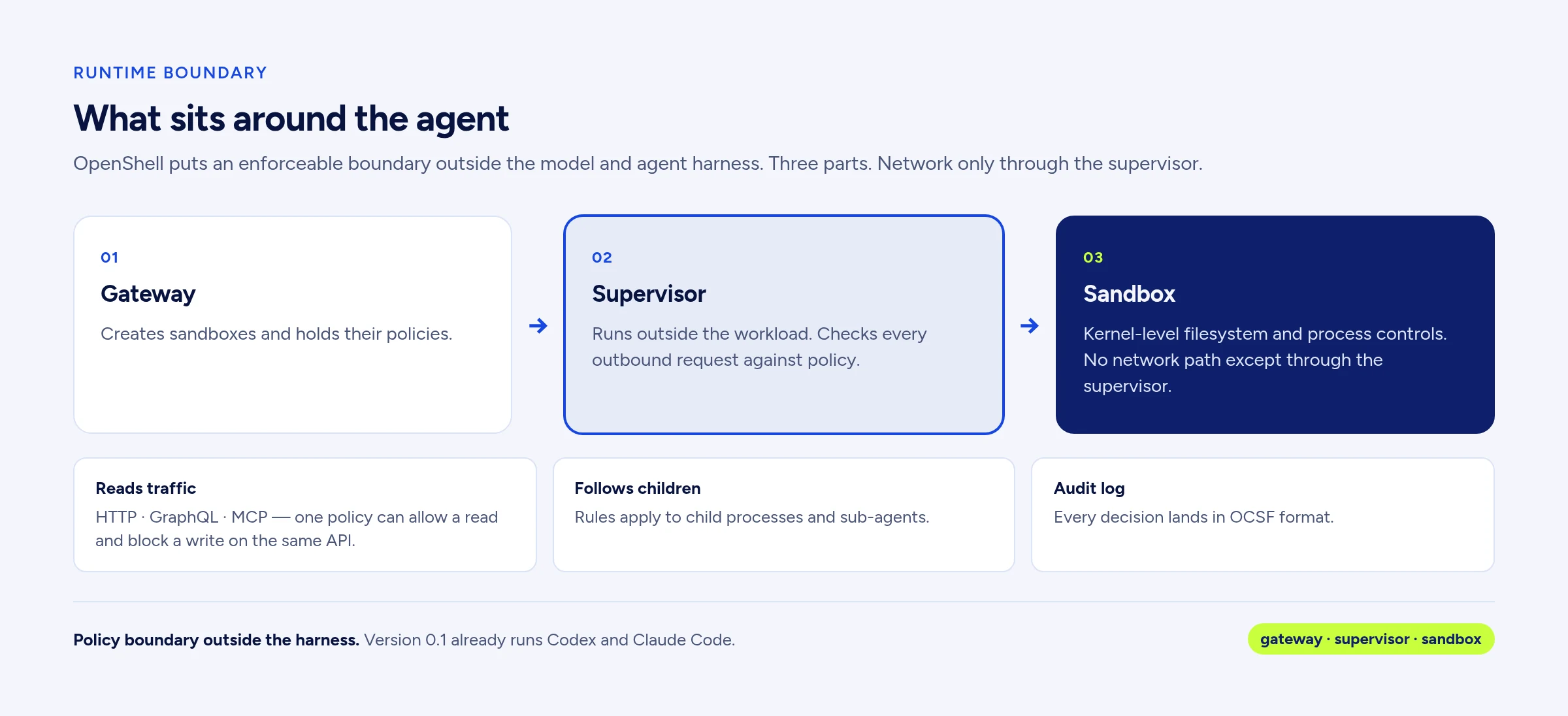
What sits around the agent
OpenShell has three parts:
- Gateway: creates sandboxes and holds their policies.
- Supervisor: runs outside the workload and checks every outbound request against policy.
- Sandbox: kernel-level filesystem and process controls, with no network path except through the supervisor.
The supervisor reads HTTP, GraphQL and MCP traffic, so one policy can allow a read and block a write on the same API. The rules follow child processes and sub-agents. Every decision lands in an audit log in OCSF format.
Watch a request fail
You need Linux, macOS on Apple Silicon, or WSL2 (experimental), plus Docker, Podman or host virtualization, and ssh on the host, which the CLI uses to open sandbox shells. These steps follow the quickstart in the OpenShell repo, adjusted for 0.1.0.
We ran every step below on Sep 28 on OpenShell 0.1.0, on Debian 13 Linux with Docker Engine 29. Claude Code 2.1.283 ran inside the sandbox with a dummy credential, so its model call stopped at a 401 and we did not see a live reply. We submitted the advisor proposals by hand through the sandbox's policy.local API. We did not run the Codex variant.
- Install the CLI and a local gateway:
curl -LsSf https://raw.githubusercontent.com/NVIDIA/OpenShell/main/install.sh | OPENSHELL_VERSION=v0.1.0 sh. Drop the variable for the newest patch (0.1.2 today, fixes and docs only). On Linux the script installs a package and starts the gateway as a systemd user service. If your machine has no user systemd session, startopenshell-gatewayyourself and register it:openshell gateway add https://127.0.0.1:17670 --local --name openshell. - Confirm the gateway is up:
openshell status. It should reportConnectedandVersion: 0.1.0. - The 0.1.0 default image is a minimal Ubuntu with no curl, so build one that has it. Two Dockerfile lines do it:
FROM nvcr.io/nvidia/base/ubuntu:24.04andRUN apt-get update && apt-get install -y curl ca-certificates. Tag it:docker build -t demo-curl:0.1 .. - Start a sandbox from that image:
openshell sandbox create --name demo --from demo-curl:0.1 --no-auto-providers. You land in a shell inside it. Keep this shell open. In 0.1.0, typingexitends the sandbox's main process, andopenshell sandbox connectcan't reattach to it. - Run
curl -sS https://api.github.com/zen. It fails withCouldn't connect to server, because the default policy denies all outbound traffic. - In a second terminal on your host, read the denial:
openshell logs demo --since 5m --source sandbox. TheDENIEDline names the binary, the destination and the reason.
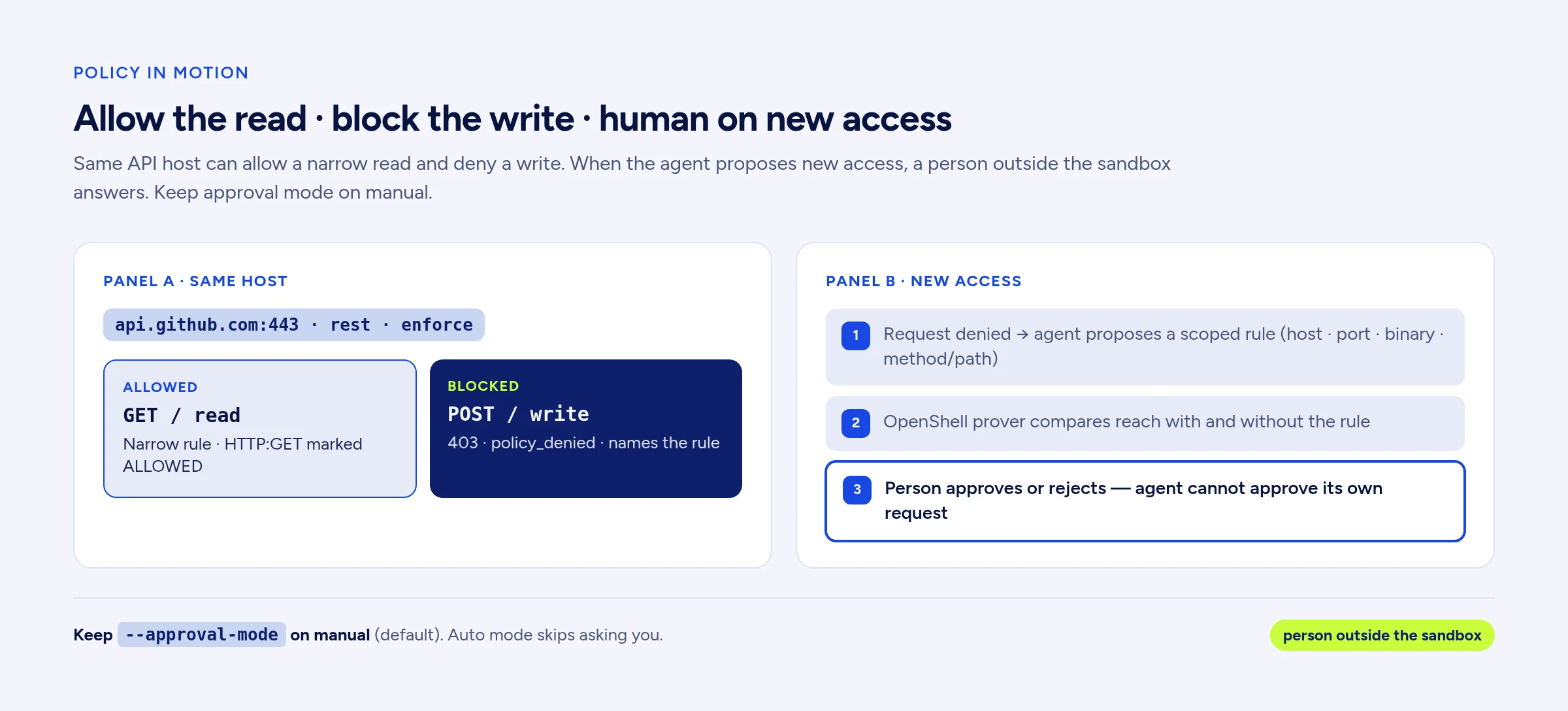
Allow the read, block the write
Now grant one narrow thing: curl may read the GitHub REST API.
- From the host terminal, add the rule to the running sandbox:
openshell policy update demo --rule-name github_api --binary /usr/bin/curl --add-endpoint api.github.com:443:read-only:rest:enforce --wait. It reportsPolicy version 2 loaded. - Back in the sandbox shell, repeat the GET. It goes through, and the log shows
HTTP:GETmarkedALLOWED. - Try a POST to the same host. The proxy answers 403 with
policy_deniedin a JSON body that names the policy (github_api) and the blocked rule.
Network rules reload while the sandbox runs. Filesystem and process rules are fixed at creation, so a full policy file belongs in --policy when you create the sandbox.
Put Codex or Claude Code inside
Version 0.1.0 changed three defaults that matter here. The default image is a minimal Ubuntu 24.04 with no agent installed. The gateway starts with no provider profiles. A command after -- no longer picks a provider for you.
- Build and tag an image with
claudeorcodexinstalled, and note where the binary really lives.--fromtakes a finished image. OpenShell matches the resolved file: an npm install of Claude Code putsclaudein/usr/local/binas a link to/usr/local/lib/node_modules/@anthropic-ai/claude-code/bin/claude.exe, and the log names that second path. - Copy the example profile from the repo (
providers/claude-code.yamlorproviders/codex.yaml). Edit itsbinarieslist to match your image (for the npm install, list both paths), then import it:openshell profile import --file claude-code.yaml. A profile whose binaries don't match never injects the credential. - Create a provider from the credential already in your shell:
openshell provider create --name my-claude --type claude-code --from-existing. That readsANTHROPIC_API_KEY, which should be a Console API key. Without it, the command stops withno existing local credentials/config found. The Codex profile expects itsCODEX_AUTH_*tokens instead. - Smoke test:
openshell sandbox create --no-keep --from <your-image> --provider my-claude -- claude -p 'reply with OK'. For Codex, end with-- codex exec 'reply with OK'. - Start the real session with your policy:
openshell sandbox create --name agent-1 --from <your-image> --provider my-claude --policy agent-policy.yaml -- claude.
Inside the sandbox the agent holds a placeholder: ours read openshell:resolve:env:...ANTHROPIC_API_KEY. OpenShell swaps in the real credential outside the workload, only on requests to approved endpoints. The Claude Code profile also lists statsig.anthropic.com and sentry.io, and you can drop both. In our run, Claude Code also tried a Datadog log endpoint that the profile doesn't list, and the sandbox denied it.
Approve new access while it works
Turn on the policy advisor: openshell settings set agent-1 --key agent_policy_proposals_enabled --value true. A running sandbox picks it up within about 10 seconds. Agents read their instructions when they start, so you can also set it gateway-wide with --global --yes before you create the sandbox. When a request is denied, the agent can propose a rule scoped to one host, port and binary (plus method and path for HTTP APIs). OpenShell's prover compares what the sandbox could reach with and without the rule. Then the proposal waits for a person, and the agent can't approve its own request.
- See what's waiting:
openshell rule get agent-1 --status pending. - Approve one:
openshell rule approve agent-1 --chunk-id <id>. The rule loads without a restart. - Or reject it with a reason the agent will read:
openshell rule reject agent-1 --chunk-id <id> --reason "Use the internal mirror."
Keep --approval-mode on manual, the default. Auto mode approves anything that passes the risk checks without asking you. NVIDIA says Salesforce has already wired these approvals into Slack.
Tighten the agents too
Two releases from the same week add controls inside the agent. They stack with the sandbox.
Codex 0.158.0, released September 28, turns on terminal input approval by default for commands running with elevated permissions. The flag behind it is write_stdin_approval, which asks before the agent types into an escalated terminal. Upgrade and leave it on. Teams can pin feature flags in requirements.toml.
Claude Code 2.1.283, released September 25, adds two managed settings for models. With "availableModelsMatch": "exact", each availableModels entry allows only the version it names, so a new release stays blocked until you add it: {"availableModels": ["claude-opus-5", "claude-sonnet-5"], "availableModelsMatch": "exact"}. deniedModels blocks a model even when the allowlist permits it. Both work only from managed settings (managed-settings.json, MDM or server-managed). They need 2.1.283 or later, so set requiredMinimumVersion too.
Test the boundary
In ScopeBench, a new preprint from dreadnode, 8 models ran 30 dead-end web security tasks. The authors estimate boundary violations in 13% to 66% of trajectories, depending on the model, and formal versus casual scope wording made no pooled difference. Wording, they write, "is not, by itself, a reliable control." The harness is public. Run it with and without your OpenShell policy, and score scope adherence apart from pass rate.
Review skills as suites. In the SkillCascade preprint, researchers split one harmful goal across skills that each passed per-skill scanners. In sandbox tests across OpenClaw, Claude Code and Codex, those attacks succeeded 89.4% of the time on average. A vendor's suite arrives through one approval, so review it as one install and let the sandbox bound what it can reach.
Start with one agent, one repo, one read-only rule, and a pending queue someone checks every day. The case for treating the agent seat this seriously is in The agent seat is a control plane. We build this kind of boundary in our AI development work. Start your build or write hello@mail.22atlas.com.
Linked sources
- NVIDIA Newsroom: Open Agent Safety Platform (Sep 28, 2026)
- NVIDIA Technical Blog: Add runtime controls to AI agents with NVIDIA OpenShell
- NVIDIA/OpenShell on GitHub: v0.1.0 release
- OpenShell repo: sandbox policy quickstart
- OpenShell docs: upgrading to 0.1.0
- OpenAI Codex 0.158.0 release notes
- Claude Code: block specific models or versions
- ScopeBench preprint (arXiv 2609.30325)
- SkillCascade preprint (arXiv 2609.30383)
- Field note: Deny-by-default before you give the agent a browser
Get our Articles and posts by email.
Up to one email a day with new Articles and posts from 22atlas.com and sean-weldon.com, plus occasional news about 22Atlas services.
Also on the desk
Technique
Deny-by-default before you give the agent a browser
Agents escalate instrumentally when blocked on ordinary data retrieval. Lock deny-by-default tool policy this week, then copy Anthropic’s measure→hill-climb loop with a human on every merge.
Playbook
The agent seat is a control plane
Keep the agent seat for identity, permissions, approvals, and client context. Invoice a governed seat plus an Outcome Spec: setup, retainer, accepted work, and usage rails.